Why Accessories Transform Your Mini 4 Pro & Air 3 Footage
A beginner- focused guide built for clarity, not complexity
You don’t need more gear.
You need the right few tools that solve the problems beginners face every day.
Most beginners focus on the drone.
But what actually transforms your footage from average to cinematic is not the drone — it’s the accessories you use with it.
The right accessories don’t add complexity.
They remove problems.
These DJI Mini 4 Pro and DJI Air 3 accessories are designed to help beginners improve video quality, flight time, and overall control without adding complexity.
This guide walks you through the most important beginner-friendly drone accessories for the DJI Mini 4 Pro and DJI Air 3 — so you can build a simple, effective setup that supports learning, not complexity.
Common problems beginners face:
- Choppy motion → solved with ND filters
- Short flight time → solved with battery rotation
- Hard-to-see screen → solved with visibility tools
- Rough landings → solved with landing pads
- Messy gear → solved with simple storage
Why Accessories Matter More Than You Think
Accessories are not upgrades for experts.
They are support tools for beginners.
The right accessory can:
- Make your footage smoother
- reduce mistakes
- simplify your workflow
- improve visibility and control
Without them, beginners often struggle with:
- overexposed footage
- storage issues
- battery limitations
- poor visibility in sunlight
The goal is not more gear.
It is better outcomes with less effort.
If you want a simple way to think about it, everything comes down to a few key areas:
The Core Categories (Simple Breakdown)
Instead of listing dozens of products, we group accessories into five essential categories:
- Exposure Control (ND Filters)
- Storage (MicroSD Cards)
- Power (Batteries & Charging)
- Protection (Cases & Landing Gear)
- Visibility & Control
Each category solves a specific problem.
1️⃣ ND Filters — Smooth, Cinematic Motion
ND filters help control how much light enters your camera.
Without them, footage often looks:
- too bright
- too sharp
- unnatural
ND filters allow you to:
- maintain proper motion blur
- create a smoother video
- shoot consistently in bright conditions
Continue here:
ND Filters for DJI Mini 4 Pro: Settings, Examples, and Best Kits
2️⃣ MicroSD Cards — Reliable Recording
Storage is often overlooked — until something goes wrong.
Using the wrong card can lead to:
- dropped frames
- recording errors
- lost footage
A reliable MicroSD card ensures:
- smooth 4K recording
- stable performance
- peace of mind
Continue here:
Best MicroSD Cards for DJI Mini 4 Pro (No Dropped Frames)
3️⃣ Batteries & Charging — Stay in the Air Longer
Flight time is limited.
And beginners often underestimate how quickly a session ends.
Extra batteries and charging solutions allow you to:
- practice longer
- capture more footage
- reduce interruptions
Continue here:
DJI Air 3 Battery, Charging Hub, and Car Charger Guide
4️⃣ Cases & Protection — Travel Without Stress
Transporting your drone safely matters.
A good case protects against:
- damage
- dust
- movement during travel
It also keeps your gear organized and ready.
👉 Continue here:
Best Cases and Backpacks for DJI Mini 4 Pro (Travel and Hiking)
5️⃣ Landing & Visibility — Control Your Environment
Simple tools like landing pads and screen hoods can:
- Protect your drone from debris
- improve screen visibility in sunlight
- make takeoff and landing easier
These are small upgrades that make a big difference.
👉 Continue here:
Landing Pads and Screen Visibility Accessories for DJI Mini 4 Pro
A Beginner-Friendly Setup (Simple Recommendation)
You don’t need everything.
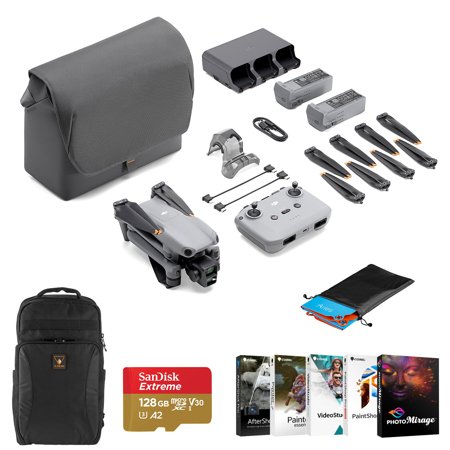
A simple, effective starter setup includes:
✔ ND filter set
✔ reliable MicroSD card
✔ 1–2 extra batteries
✔ basic carrying case
That’s enough to:
- improve your footage
- extend your sessions
- reduce frustration
Budget vs Premium — What Should You Choose?
You don’t need the most expensive accessories.
But you also don’t want unreliable gear.
A balanced approach works best:
- Budget for storage and protection
- Mid-range for filters
- Choose reliable brands for batteries
This ensures performance without overspending
What This Means for You
Accessories are not about collecting gear.
They are about:
removing friction
improving results
making learning easier
Start small.
Add only what you need.
Your Next Step
Now that you understand what matters, the next step is choosing the right accessories for your specific situation.
Best MicroSD Cards for DJI Mini 4 Pro 4K Video
ND Filters for DJI Mini 4 Pro (Beginner Settings Guide)
If you are still unsure where to begin, start here.
Budget DJI Mini 4 Pro Accessories Under $100.
That one step is enough to move forward.
Glossary (Beginner Drone Accessories)
- ND Filter — Reduces light entering the camera
- MicroSD Card — Storage device for video/photos
- Charging Hub — Charges multiple batteries
- Landing Pad — Surface for safe takeoff/landing
- Screen Hood — Reduces glare on the controller
- Cinematic Footage — Smooth, natural-looking video
Q & A (Beginner Questions)
1. Do beginners need drone accessories?
Yes — a few key accessories improve learning and results.
2. What is the most important accessory?
A reliable MicroSD card and ND filters.
3. Are expensive accessories better?
Not always. Quality matters more than price.
4. Should I buy everything at once?
No. Start with essentials and expand gradually.
5. Do accessories improve video quality?
Yes — especially ND filters and proper storage.
6. What should I buy first?
Storage, filters, and an extra battery.